Offline Currency Converter for Travel
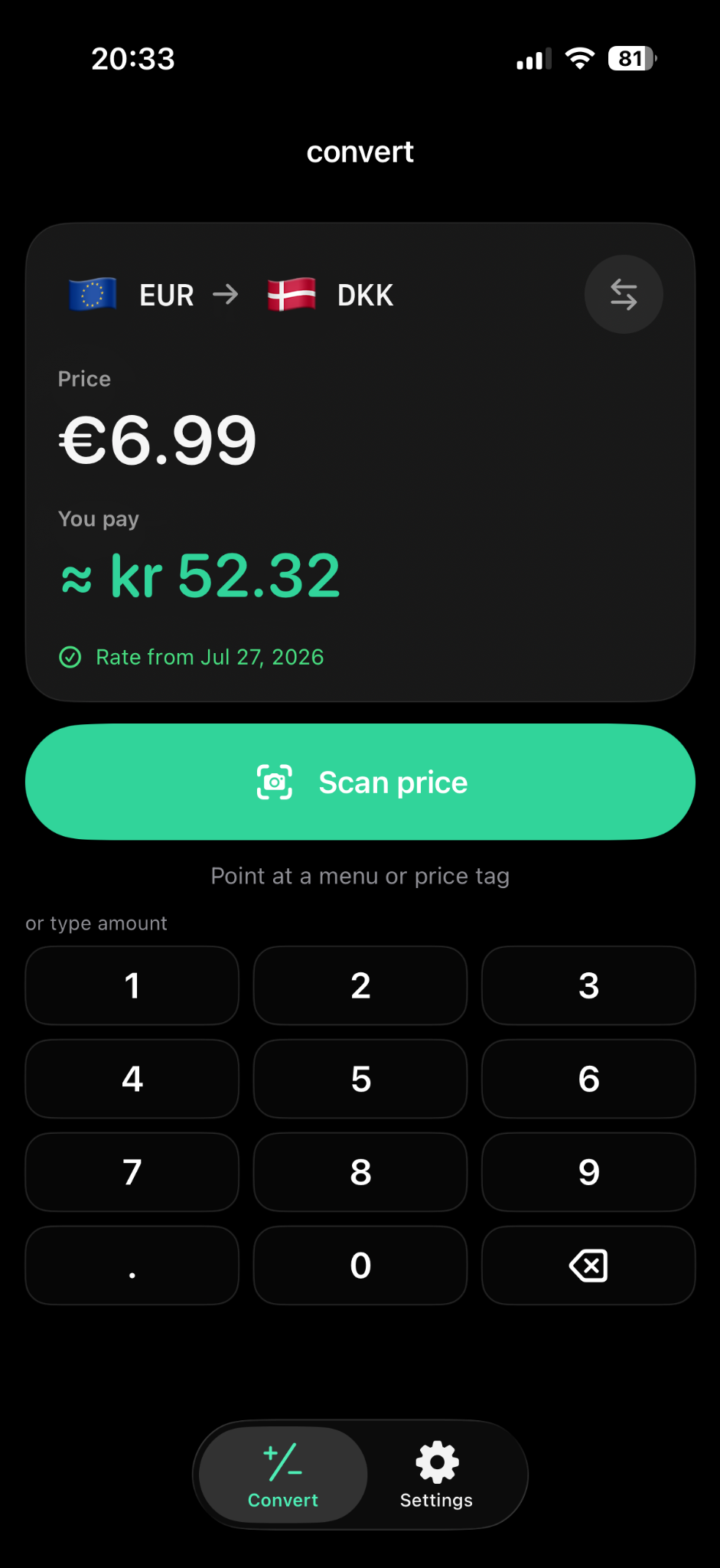
Currency Converter Lens can convert amounts without internet after setup and a successful exchange-rate update. It stores rates on your device and uses the last available saved rate when connectivity is unavailable. Offline results are estimates based on that saved rate; they do not include new market movements until rates can be updated online.


Can I use a currency converter without internet?
Yes, if the converter already has an exchange rate available for the currencies you want to use. Currency Converter Lens saves exchange rates after a successful update, so an internet connection is not required for every subsequent calculation. You can enter an amount and convert it using the saved rate.
The key distinction is between updating the rate and calculating a result. An update normally needs connectivity to retrieve a rate. The calculation can use a rate already saved on your iPhone. Opening the app for the first time without a successful update is different from continuing to use it offline after setup.
How should I prepare saved rates before a trip?
- Open Currency Converter Lens while you have a reliable internet connection.
- Choose your travel currency as the price currency and your home currency as the result currency.
- Allow a successful exchange-rate update and check the rate date shown on the conversion screen.
- Enter a simple amount to check the currencies and conversion direction.
- Before depending on it, try a conversion without connectivity to confirm the saved rate is available for your selected currencies.
If your trip includes another currency, prepare that selection while connected too. Do not assume a newly selected currency has a usable saved rate just because a different conversion worked earlier. Checking before departure is more convenient than discovering a missing rate while standing at a checkout.
Does a camera currency converter work offline?
Currency Converter Lens combines camera price scanning with conversion using saved exchange rates. After setup, you can use the saved rate when connectivity is unavailable. Point the iPhone camera at a readable menu price or shelf label, review the detected amount, and confirm the number you want to convert.
The camera workflow and the rate’s freshness are separate checks. A clearly detected amount can still be converted with an older saved rate. Equally, a recently updated rate does not guarantee that the scanner has chosen the correct number. Verify both the input and the rate date before relying on the estimate.
What exchange rate does offline conversion use?
Offline conversion is based on the last available saved exchange rate. It does not keep following market changes without connectivity. If a rate was saved before a flight, later calculations without internet continue to use that saved information until another update succeeds.
The rate date is therefore useful context, rather than decoration. A rate saved recently and one saved much earlier may give different estimates for the same amount. How much that matters depends on rate movement and the size of the purchase. For a larger purchase, consider refreshing online before using the result as part of your decision.
The converted figure also may differ from your eventual charge. Banks, card issuers, ATMs, and merchants can use their own rates and fees. An updated app rate remains an estimate of the foreign amount in your chosen currency, rather than a promise about the final payment.
Where is offline conversion useful while traveling?
Saved rates can help when a supermarket has weak reception, a café has no usable Wi-Fi, or you are traveling with mobile data disabled. You can still check what a visible price roughly means in a familiar currency instead of waiting for a connection each time.
At a restaurant, scan or type the menu price for a quick comparison. In a shop, check the item’s shelf label or price tag. Keep the last saved rate’s age in mind, especially if several days have passed since your last update. Offline convenience is most useful when you have already prepared the app and understand what its estimate is based on.
What if scanning or updating is inconvenient?
Use manual conversion when glare, small print, or a crowded label makes the amount hard to detect. Entering the price manually uses the available exchange rate just as camera-based conversion does. Typing can fix the input problem, but it does not make an older offline rate more current.
If there is no usable saved rate for your selection, reconnect and complete an update before relying on offline conversion. When internet access returns after time offline, update again and check the displayed date. Avoid assuming that an attempted refresh has replaced the old rate unless the update has succeeded.
Manual conversion remains available without Pro. The existing one-time Pro purchase unlocks unlimited camera scans. Neither scanning nor the purchase changes the basic offline limitation: a saved exchange rate needs an online update to reflect newer rate information.